
Never Miss an Important Alert Again!
The Floral POS Message Center now gives you more control over how strongly the system gets your attention. From a simple notification to an alert that stays visible until someone acknowledges it, your shop can choose exactly how important messages should behave.
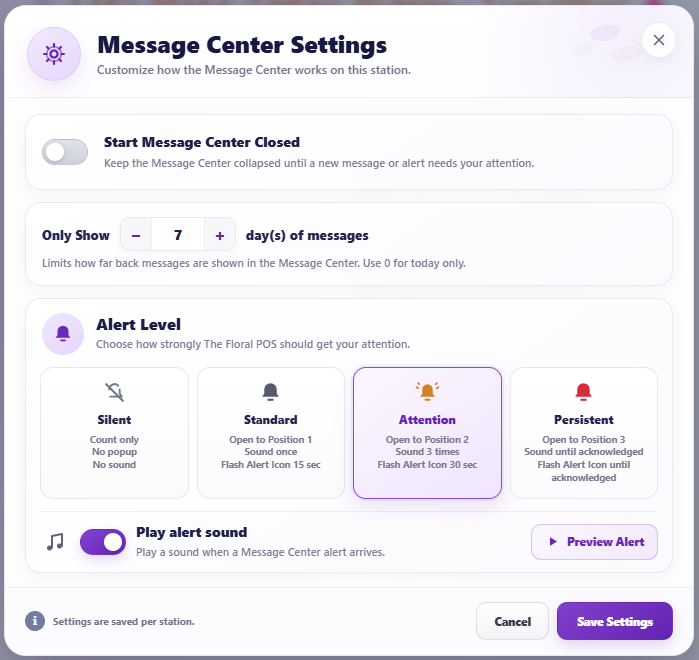
Every message isn’t equally important. That’s why the new Message Center lets you choose the alert behavior that makes sense for your shop — especially when an important order or notification needs someone’s attention.
From Silent to Persistent
Three active alert levels give you increasing levels of visibility — plus Silent when you only want the Message Center to keep count.
Silent
Count only.
No popup.
No sound.
Standard
Opens to Position 1.
Sounds once.
Alert flashes for 15 seconds.
Attention
Opens to Position 2.
Sounds three times.
Alert flashes for 30 seconds.
Persistent
Opens to Position 3.
Sounds until acknowledged.
Alert flashes until acknowledged.
Designed for the Messages You Can’t Afford to Miss
Flower shops can get busy fast. When an important notification or incoming order needs attention, the new alert levels give you the ability to make that message as noticeable as it needs to be.
Don’t Miss the Message. Don’t Miss the Order.
Configure your new Message Center Alert Level and choose exactly how The Floral POS should get your attention.